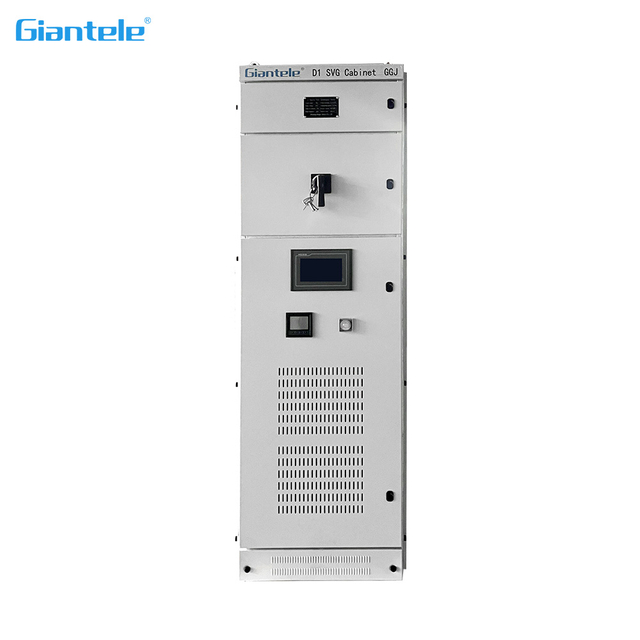
VFD control panel design ensures that the motor rotates at the right speed with increased safety and convenient servicing. VFD control panel unifies the drive, AC drive protection, wiring diagram, schematic, terminal block, terminal strip, faults, and troubleshooting points into one cohesive system.
In most industrial plants, a VFD control panel means much more than just a metal box. The control panel regulates the speed of motors, provides protection from malfunctions, and makes regular maintenance easier by having everything organized properly.
Any control panel should meet three requirements. Firstly, what elements does the panel include? Secondly, how should a technician interpret the schematic diagram? Finally, what should a technician know to troubleshoot the faults correctly without any assumptions?
Here you will get answers to all these questions about the VFD control panel design and troubleshooting techniques.
Functional Area | Main Components | Main Purpose |
|---|---|---|
Power Section | Main switch, breaker, protection devices, incoming terminals | Receives and protects the incoming power supply before it reaches the drive |
Drive Section | Variable frequency drive / AC drive | Controls motor speed, start, stop, acceleration, and output frequency |
Control Section | Push buttons, selector switches, relays, PLC signals, sensors | Sends start, stop, reset, speed, and safety commands to the drive |
Wiring Section | Terminal block, terminal strip, wire labels, cable ducts | Keeps power, control, and signal wiring organized and traceable |
Cooling Section | Fans, vents, filters, cabinet space | Removes heat from the VFD cabinet and helps prevent overheating faults |
Grounding Section | Grounding bar, cabinet grounding, shield grounding | Reduces electrical noise and supports safer, more stable operation |
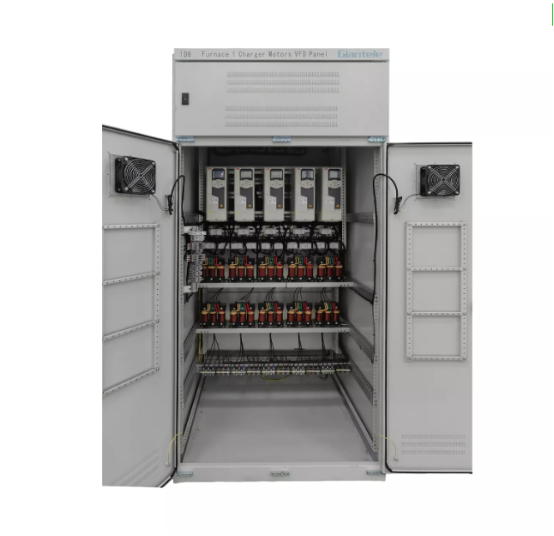
A VFD panel has several main areas. These areas include the power section, drive section, control section, cooling section, and wiring section. Each area has a clear role, so the panel can work safely and smoothly.
The power section begins with the feed. Power goes through the main switch, breaker, or any protective equipment after that. After all of this, the drive input is reached.
Drive is the central part of the whole drive cabinet. It is responsible for transforming the fixed input power to the output power and feeding the output power to the motor. It allows starting, stopping, and varying the speed of the motor.
The control section processes the signals that arrive from push buttons, selector switches, sensors, relays, or PLC. They control starting, stopping, resetting, or changing the speed.
The cooling system is important too. The drive produces the heat while working; thus, the proper cooling system is necessary, i.e. fans, ventilation system, filters, and enough free space. Otherwise, the trip may happen, and the service life will be reduced.
Proper grounding and shielding are important too. Grounding is needed for noise reduction and stable signals. Speed signals and control wiring should be shielded.

A schematic shows how the VFD panel works. It does not only show parts. It shows how power, control signals, and safety circuits connect together.
Start with the power circuit. Look for the incoming supply, main switch, protective device, drive input, drive output, and motor terminals. This path shows how power moves from the supply side to the motor.
Then move to the control circuit. This part shows start, stop, reverse, reset, speed input, alarm output, and safety signals. These signals do not carry motor power, but they control the drive behavior.
A wiring diagram gives more exact connection details. It shows where each wire starts and ends. It also shows the terminal block number, wire label, and device symbol.
A single-line diagram gives a simple overview. It helps readers understand the system quickly. But a detailed schematic helps technicians trace real faults during service.
Clear labels make the schematic useful. If the drawing says one thing and the cabinet shows another, troubleshooting becomes slow. So the final drawing should always match the real panel.

Wiring for the VFD panel should keep the power cables separate from the signal cables. This minimizes interference and increases cabinet visibility. Additionally, this allows for avoiding incorrect connections during installation.
The power input wiring links the power source and drive. Typically, the input wiring is labeled L1, L2, and L3. The installer must match the power voltage and phases with the drive rating.
The motor output wiring links the drive to the motor. Motor output terminal numbers are usually marked U, V, and W. If the motor rotates incorrectly, the output phases can be switched to change the rotation direction.
The control wiring contains low-voltage command signals. Control commands may include run, stop, forward, reverse, reset, and selecting the speed. Terminal strip helps organize these wires and test them.
Analog signals are commonly used for speed control. The signals used include 0-10V and 4-20mA. The sensor, potentiometer, or the control system can generate the signal for the AC drive.
Analog wiring requires good routing. Avoid running it near motor output wiring. Use shielded wiring wherever necessary because the noise in the signal could affect the speed stability.
The relay outputs are capable of transmitting the panel status to other systems. It could indicate that the system is operating, has an error, is ready, or is alarming.
Parameter Item | What to Set or Confirm | Why It Matters |
|---|---|---|
Motor Rated Voltage | Match the motor nameplate voltage | Helps the drive protect the motor correctly |
Motor Rated Current | Enter the rated current from the nameplate | Prevents overload protection from being too high or too low |
Motor Rated Frequency | Set the correct operating frequency | Ensures the motor runs within its designed range |
Command Source | Keypad, terminal control, or PLC control | Allows the VFD panel to respond to the correct start and stop signals |
Frequency Reference | Keypad, analog input, potentiometer, or control system | Ensures speed control comes from the intended source |
Acceleration Time | Set a suitable startup ramp | Reduces starting current and mechanical stress |
Deceleration Time | Set a suitable stopping ramp | Helps avoid trips caused by fast stopping on heavy loads |
Protection Limits | Current limit, overload, max/min frequency, reset mode | Improves safety and reduces unexpected downtime |
Correct wiring is not enough. The drive also needs correct parameter settings before startup. These settings tell the drive how to control and protect the motor.
Start with motor nameplate data. Enter rated voltage, rated current, rated frequency, rated power, and motor speed. These values help the drive calculate load and protection limits.
Next, set the command source. The panel may use keypad control, terminal control, or PLC control. If this setting does not match the wiring, the motor may not run.
Then set the frequency reference. The speed may come from the keypad, analog input, potentiometer, or control system. The setting must match the actual speed signal.
Acceleration time controls how fast the motor starts. A very short ramp can cause high current. A longer ramp can make startup smoother and reduce stress.
Deceleration time controls how fast the motor stops. A very short stop time may cause a fault on heavy loads. So the stop ramp should match the machine.
Also check limits and protection settings. These include maximum frequency, minimum frequency, current limit, overload setting, reset mode, and restart behavior. Good setup helps prevent damage and downtime.
VFD panel troubleshooting should follow a clear order. First, read the alarm. Then check the schematic, wiring, parameters, and machine condition. This method saves time because it avoids random testing.
If the panel powers on but the motor does not run, check the run command first. Then check the stop circuit, enable signal, and frequency reference. Also confirm that the command source is correct.
If the panel shows overcurrent, inspect the load. A jammed pump, stuck conveyor, or locked motor can draw too much current. Also check acceleration time and motor data.
If the motor runs but speed changes badly, check the analog signal. Loose wires, poor shielding, or wrong signal range can create unstable control. The terminal block should also be tight and clean.
If the panel trips on heat, inspect airflow. Dirty filters, failed fans, blocked vents, or high cabinet temperature can cause heat faults. Clean the cabinet and restore airflow before restart.
If the motor makes unusual noise, check output wiring and grounding. Also check cable length and nearby power cables. Electrical noise can affect both the motor and control signals.
A good fault check also includes visual inspection. Look for loose terminals, dark marks, dust, moisture, and damaged insulation. Small signs can point to larger problems.
Fault Symptom | Possible Cause | First Check |
|---|---|---|
Panel powers on, but motor does not run | Missing run command, stop circuit active, wrong command source | Check run signal, enable signal, stop circuit, and parameter settings |
Overcurrent fault | Heavy load, jammed machine, short acceleration time, wrong motor data | Inspect the load, motor wiring, acceleration time, and nameplate settings |
Unstable motor speed | Analog signal noise, loose terminal, wrong signal range | Check shielded cable, terminal block, analog input setting, and signal source |
Overheating fault | Dirty filter, failed fan, blocked vent, high cabinet temperature | Inspect airflow, clean filters, and confirm fans are working |
Motor rotates in the wrong direction | Incorrect output phase sequence | Check U, V, W motor output wiring |
Frequent nuisance trips | Poor grounding, electrical noise, loose wiring, incorrect protection settings | Check grounding, cable routing, terminal tightness, and fault history |
Alarm output not working | Relay setting error, wiring issue, wrong output logic | Check relay output terminals and alarm parameter configuration |
A reliable VFD panel needs regular inspection. Small checks can prevent major faults. They also make maintenance faster and safer.
Before power-on, check all wire connections. Confirm that each wire matches the wiring diagram. Make sure terminals are tight, and no loose strand touches another point.
Check the terminal strip and labels. Each wire should have a clear number or mark. Clear labeling helps technicians trace signals during troubleshooting.
Inspect grounding points. The cabinet, door, drive, motor cable shield, and grounding bar should connect firmly. Good grounding supports stable operation.
Review cabinet cooling. Make sure fans run well and filters stay clean. Keep enough space around heat-producing parts, because blocked airflow can shorten drive life.
During commissioning, test the motor without load when possible. Check direction, speed change, start, stop, emergency stop, and reset functions. Then test the machine under real load.
Keep records after setup. Save the final schematic, parameter list, alarm history, and service notes. These records help the next technician solve problems faster.
Giant Electric focuses on practical electrical panel solutions for industrial users. Clear layout, proper wiring, and reliable control design help customers reduce downtime.
A well-thought-out VFD panel is one that allows for proper configuration, schematic design, wiring, parameter setting, and fault tracing all according to the same principle. They complement each other, thereby making the entire motor control system easy to operate.
An organized VFD cabinet allows the operators to work comfortably. An easily understandable wiring diagram allows the technician to find faults easily. A labeled terminal box will avoid confusion. The parameters will ensure that the drive protects the motor.
In the manufacturing industry and other areas such as the pumping, fans, conveyor belt, among others, the properly designed VFD control panel will help improve the speed control while minimizing mechanical stress.
It is only through proper planning that these good results can be attained. This involves proper selection of the drive, designing an efficient schematic, proper wiring, and efficient fault tracing step by step.
A: A VFD Panel includes the drive, terminals, protection, cooling, and control wiring.
A: Use the VFD Panel drawing to trace power, signals, grounding, and output.
A: A VFD Panel improves speed control, smooth starting, and fault checking.
A: VFD Panel cost depends on drive size, cabinet, protection, and control options.
A: A VFD Panel controls speed; a soft starter mainly reduces starting shock.
A: Check alarms, wiring, parameters, heat, grounding, and signal noise step by step.